Training Your Chatbot
Train Your Chatbot on PDFs and Files
Uploading Files
1
Go to Training & Content
In your chatbot dashboard, click Training & Content in the sidebar.
Click the + Add Sources button.
4
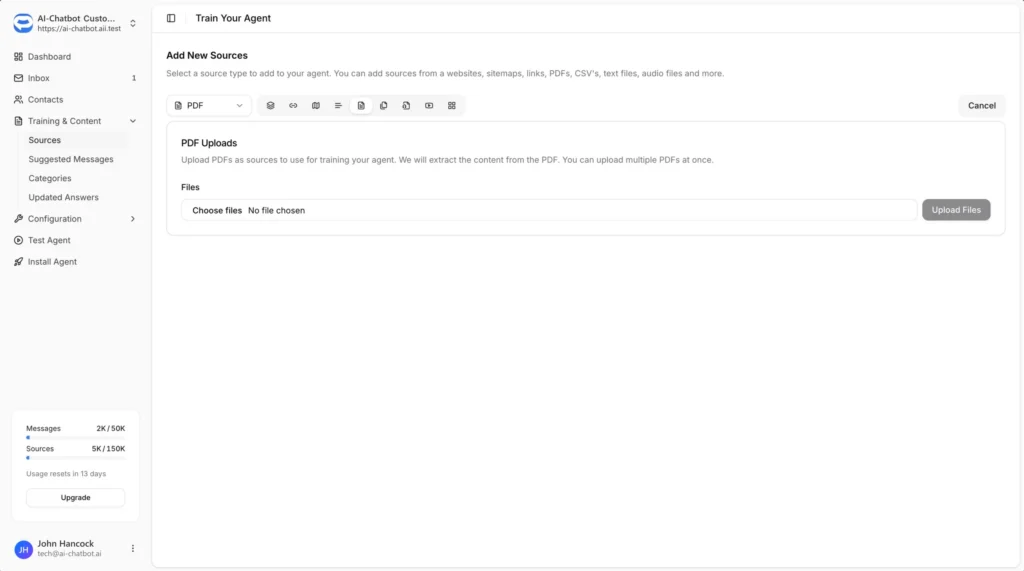
Select PDF from the dropdown
Select PDF from the source type dropdown.
Click Choose files and select the files you want to upload. You can upload multiple files at once.
Click the Upload Files button to upload and start training on your documents.
Supported File Types
From the PDF source type, you can upload:
- PDF files (.pdf)
- CSV files (.csv)
- Text files (.txt)
Best Practices
Ensure Text is Extractable
- PDFs should contain actual text, not just scanned images
- Check that you can copy and paste text from your PDF before uploading
- Scanned documents may not extract properly if they haven’t been OCR processed
Use Descriptive File Names
- Name your files clearly so you can identify them in your Sources list
- This makes it easier to manage and update content later
Keep Content Current
- Re-upload files when the content changes
- Delete outdated versions from your Sources to avoid confusion