Connect AI Chatbot to Zapier
Prerequisites
Step 1: Create a AI Chatbot API Token
In your AI Chatbot account, click on your profile and select API Tokens.
Click Create Token and give it a descriptive name (e.g., “Zapier Integration”).
Copy the newly created API token. You’ll need this to connect Zapier to your account.
Confirm the connection
- A green Connected badge
- Your AI Chatbot Account name
- The Chatbot selected for the trigger
New leads captured by that chatbot will now flow through the Zap to your destination app.
Step 2: Create a New Zap
Log in to your Zapier account and click Create Zap.
Step 3: Configure the Trigger
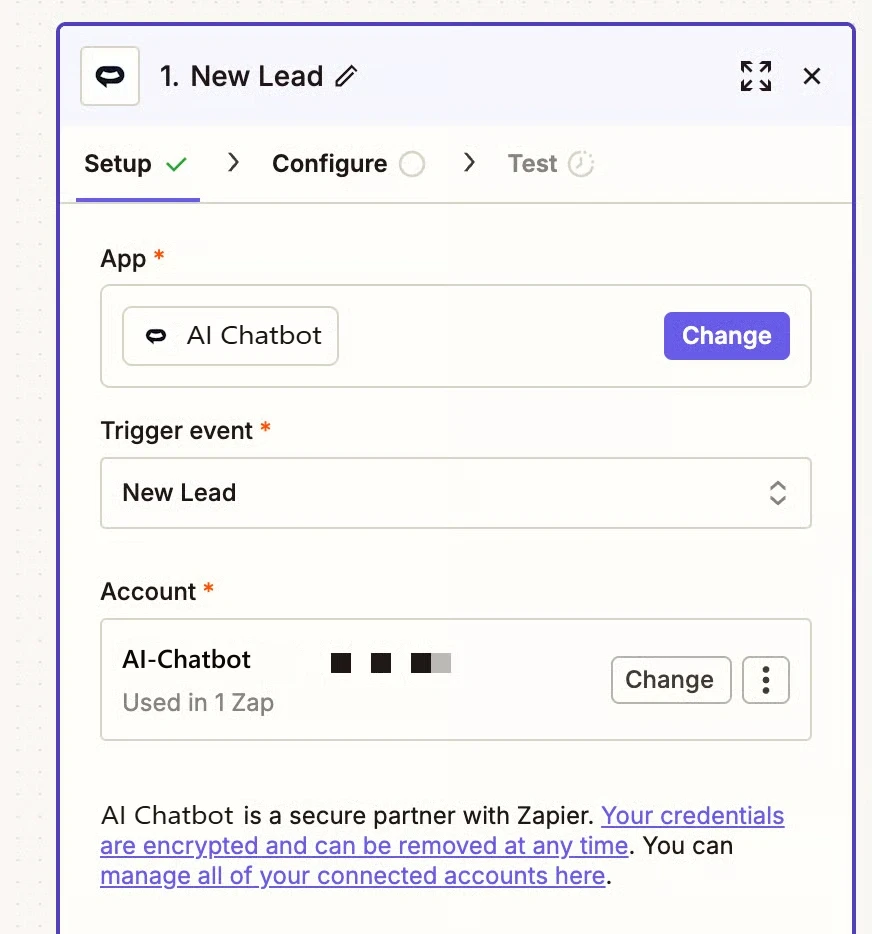
In the Trigger section, search for and select AI Chatbot.
Select New Lead as the trigger event. This fires whenever a visitor submits a lead capture form.
Click Sign in and enter the API token you created earlier.
Enter your chatbot’s ID. You can find this in Configuration > Settings in your AI Chatbot dashboard. The Agent ID is displayed at the top.
Click Test trigger to verify the connection is working.
Step 4: Add an Action
Example: Send Leads to Google Sheets
Click the + button to add an action step.
Search for and select Google Sheets.
Select Create Spreadsheet Row.
Connect your Google account, select your spreadsheet, and map the lead fields to columns.
Example: Notify Team in Slack
Click the + button to add an action step.
Search for and select Slack.
Select Send Channel Message.
Choose your channel and create a message template with lead details.
Example: Add to Mailchimp
Click the + button to add an action step.
Search for and select Mailchimp.
Select Add/Update Subscriber.
Map the email and name fields from the lead to Mailchimp subscriber fields.
Step 5: Test and Publish
Click Test step to verify data flows correctly to your destination app.
Check that the test data appeared in your destination (spreadsheet, Slack channel, etc.).
Click Publish to activate your Zap.
Available Trigger Data
Troubleshooting
Leads Not Triggering the Zap
Missing Data
Join over 1000+ businesses, websites and startups automating their customer service and other tasks with a custom trained AI agent.