
Communication & Messaging
Learn how to embed a custom trained AI support agent in Notion pages using iFrame embeds. Perfect for internal wikis, client portals, and knowledge bases.
Adding a custom trained AI support agent to your Notion workspace makes it easy to provide instant answers to your team or clients directly within your documentation and knowledge bases.
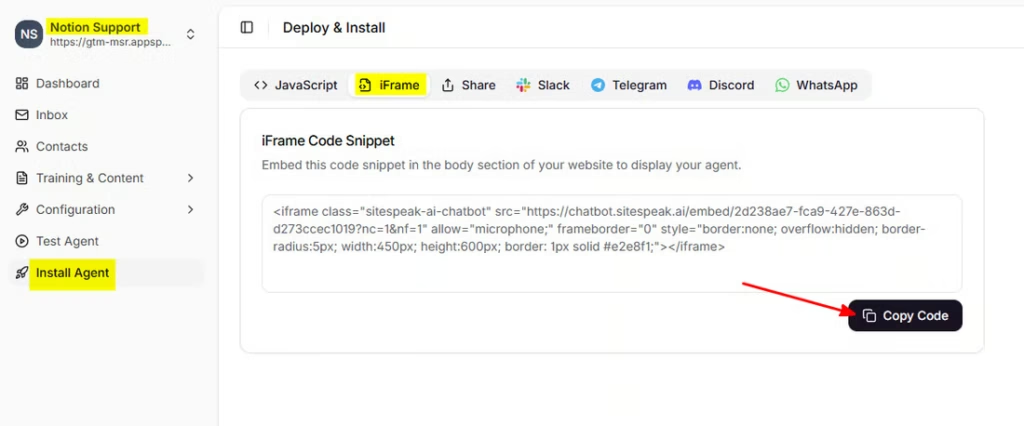
Notion supports embedding external content through iFrames, which means you can add your custom trained AI support agent to any Notion page. This works great for internal wikis, client portals, onboarding docs, and knowledge bases.
Internal knowledge base: Add an AI support agent trained on your company policies, procedures, and FAQs to help employees find answers quickly.
Client portals: Embed an AI support agent in shared Notion pages to provide 24/7 support to your clients without them needing to contact you directly.
Onboarding documentation: Help new team members get up to speed faster by adding an AI support agent that can answer questions about your processes and tools.
Product documentation: Make your product docs more interactive by letting users ask questions and get instant answers.
You can adjust the size of your AI support agent embed by modifying the width and height values in the iFrame code before pasting it into Notion. The default size works well for most pages, but you may want to make it larger for a more prominent chat experience.
AI support agent not displaying? Make sure you’re using the iFrame code (not the standard JavaScript widget code). Notion only supports iFrame embeds.
Embed appears too small? You can adjust the width and height parameters in the iFrame code before embedding, or resize the block directly in Notion.
Changes not showing? Try refreshing the Notion page or clearing your browser cache. Notion may cache embedded content.
Ready to automate your customer service with AI?
Join over 1000+ businesses, websites and startups automating their customer service and other tasks with a custom trained AI agent.