ChatIQ Alternative: More Reliable AI with Team Features

Looking for a ChatIQ alternative? AI Chatbot helps address reliability issues while offering more features, including team collaboration and flexible customization options. Moreover, it provides tools to help teams improve their chatbot workflows and manage customer interactions more efficiently.

Last updated: July 15, 2026

TL;DR

ChatIQ uses OpenAI only, has no live chat or chat inbox, and customers report reliability issues during peak hours. AI Chatbot gives you the choice of OpenAI, Anthropic, Google, or xAI models, a full inbox with live chat, and predictable uptime from $29/month.

The best ChatIQ alternatives, ranked

We compared the top ChatIQ alternatives on price, live chat, human handoff, and AI model choice. Here is how they stack up.

1

AI Chatbot BEST OVERALL

Free plan, built-in live chat and human handoff, model choice across OpenAI, Anthropic, Google, and xAI, plus free sentiment analysis and the ability to connect your own API or database. From $29/mo.

2

Enterprise helpdesk where AI is a per-agent add-on on top of per-agent seats. From $55/agent/mo plus $50/agent for Advanced AI.

3

Documentation-focused chatbot, OpenAI-only, with no live chat or human handoff. From $49/mo.

4

Popular live-chat widget whose Lyro AI is capped and billed per conversation. From $25/mo plus per-AI-conversation fees.

5

Multichannel shared inbox that gates its AI features behind the $295/mo tier. AI from $295/mo.

Why people look for ChatIQ alternatives

ChatIQ started strong but teams report reliability and feature limits as they scale.

Reliability concerns during peak hours

Users have reported ChatIQ slowdowns and timeouts during high-traffic periods. AI Chatbot runs on dedicated infrastructure designed for predictable response times, with auto-scaling across our chatbot runtime.

OpenAI-only model selection

ChatIQ is locked to OpenAI models. AI Chatbot lets you pick OpenAI, Anthropic (Claude), Google (Gemini), or xAI (Grok) on every paid plan, so you can choose the model that gives the best answers for your content.

No live chat or inbox

ChatIQ has no built-in live chat or chat inbox. When the AI cannot answer, your visitor is stuck. AI Chatbot includes a full inbox, real-time live chat, and human escalation so visitors always get help.

AI Chatbot vs ChatIQ

Compare features and see why AI Chatbot is the better choice

FeaturesAI ChatbotChatIQ
Free Plan✓ Yes✓ Yes
PricingFrom $29/monthFree tier, then custom
AI ModelsOpenAI, Anthropic, Google, xAIOpenAI
Chat Inbox✓ Yes, detailed✖ No
Live Chat✓ Yes✖ No
Escalate to Human✓ Yes✓ Yes (Manual setup)
Analytics✓ Yes, detailed (Free)✓ Yes, (Basic)
Chat Insights✓ Yes✖ No
Sentiment Analysis✓ Yes (Free)✖ No
API Access✓ Yes✓ Yes
Attach Files to Messages✓ Yes✖ No
Auto Sync Training Sources✓ Yes✖ No
Speech Recognition & TTS✓ Yes✖ No
Team Collaboration✓ Yes (From $79/month)✓ Yes
Page Context Awareness✓ Yes✖ No
Priority Support✓ Yes (From $79/month)✓ Yes (Enterprise only)

How to switch from ChatIQ to AI Chatbot

A simple step-by-step guide to migrate without losing conversations.

1

Note your ChatIQ training sources

List the URLs, documents, and PDFs your ChatIQ chatbot was trained on. AI Chatbot re-crawls the same URLs directly.

2

Create your AI Chatbot chatbot

Sign up for AI Chatbot free, create a chatbot, and paste your website URL as the first training source. Choose your preferred AI model (OpenAI, Anthropic, Google, or xAI).

3

Add supplementary sources

Upload PDFs, CSVs, or YouTube content. Connect an API or SQL database if you want the bot to fetch live data, not just answer from static content.

4

Configure the inbox and live chat

Turn on the inbox and live chat so your team can jump in when the AI needs help. Set escalation notifications so no visitor is left without support.

5

Match your brand and swap the embed

Customize widget colors, avatar, and welcome message. Replace the ChatIQ embed with the single-line AI Chatbot snippet.

6

Cancel ChatIQ

Once the new chatbot is validated, cancel ChatIQ. You gain model choice (OpenAI, Anthropic, Google, xAI), a full inbox, live chat, and dedicated infrastructure.

Chat with all of your content, including API's, databases and Youtube

With ChatIQ the types of sources you can train your chatbot on are limited. And that’s fine if you only need to create a very simple bot. But if you need a robust AI solution that can consume all of your content no matter where it’s stored, AI Chatbot is the solution for you. Connect to your API’s, databases, Youtube channels, audio files, PDF’s and more with a few clicks.
Walter Goodman, online marketing manager, AI Chatbot customer

Walter Goodman

Online Marketing Manager

The platform is very intuitive to set up and use. I was able to train the chatbot directly from our site maps with ease. After creating a test page and sharing it with leadership, customer service, sales, and marketing, the reaction was unanimous, everyone was impressed!

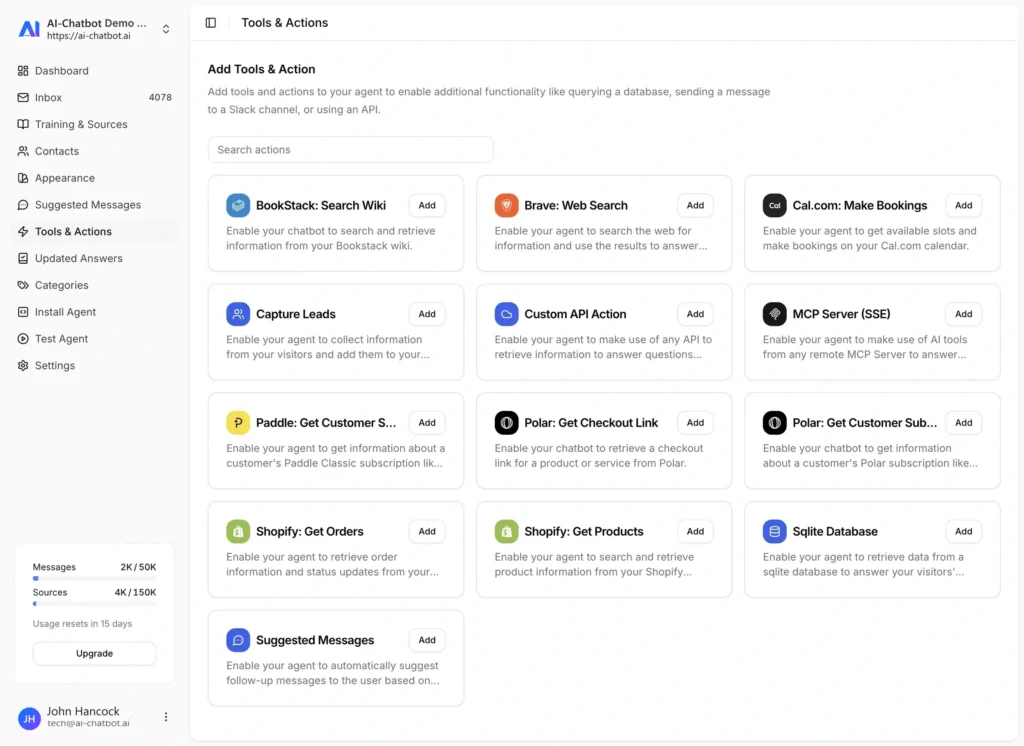
AI Chatbot Botpress alternative - features, tools and actions dashboard
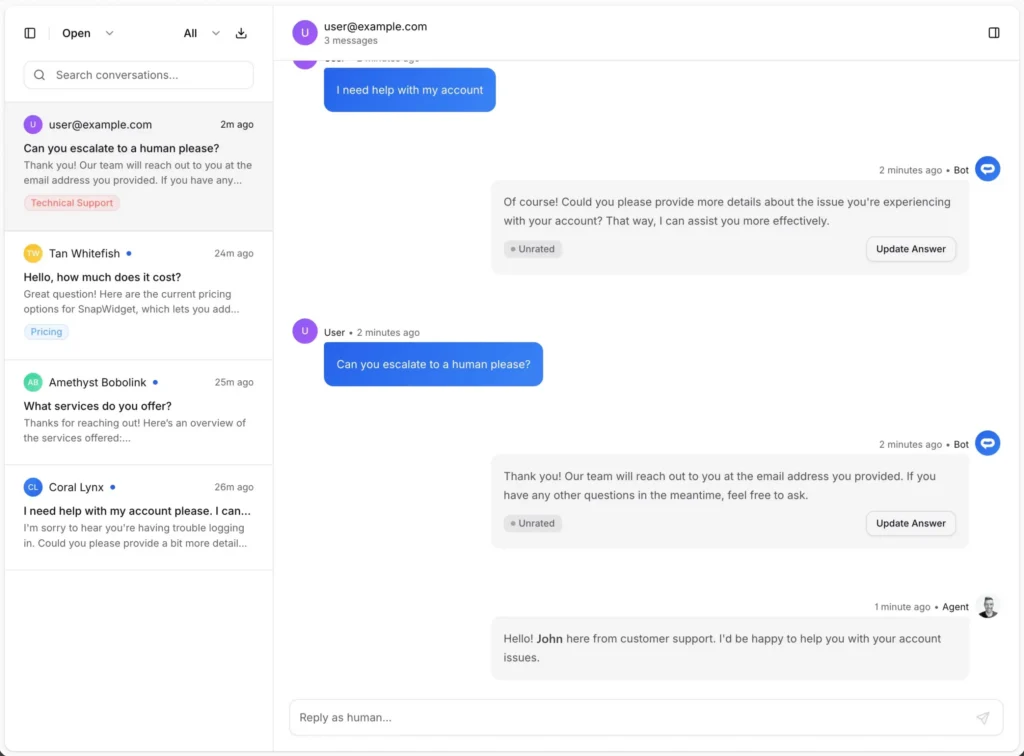
AI Chatbot Botpress alternative - live chat inbox with human handoff

Convert leads into customers

AI Chatbot offers a powerful inbox, live chat and escalation feature that lets your visitors leave their contact details for a human agent to contact them in case your chatbot is not able to provide the answer they are looking for. Never miss an opportunity to convert!
Michael Evers, marketing specialist, AI Chatbot customer

Michael Evers

Marketing Specialist

I think AI Chatbot is a super easy and extremely powerful tool to start installing into your website.

Train your chatbot on all your content

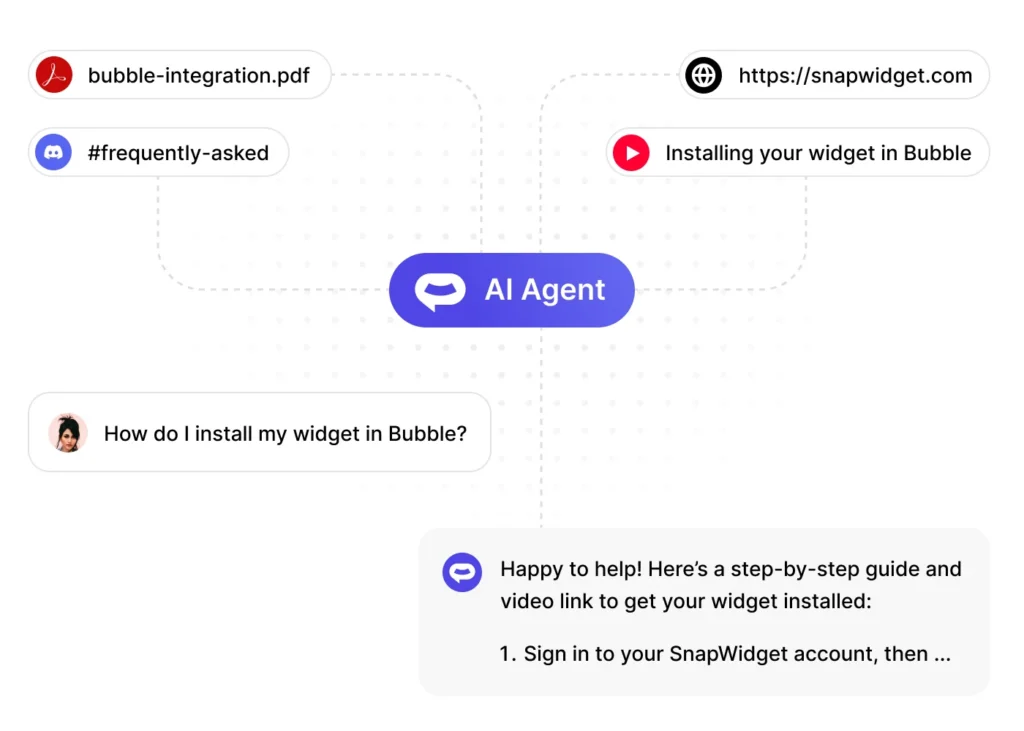
Use data from your website, knowledge base, support docs, text files, Youtube content, audio files, PDF’s and CSV’s to train your chatbot. Your visitors will always be able to get the right answer to their question in realtime, 24/7.
Donald Smith, co-founder, AI Chatbot customer

Donald Smith

Co-Founder

I stumbled across AI Chatbot AI while having a chat with my ChatGPT. I am absolutely gobsmacked at how good it is and how easy it has been to setup. Any concerns I had have disappeared and this certainly is the way forward. I will be using AI Chatbot AI on all my websites now.

AI Chatbot Botpress alternative - training sources for auto-sync

Frequently asked questions

Everything you need to know about AI Chatbot. Can’t find what you’re looking for? Start a free trial and see it in action.

Is AI Chatbot more reliable than ChatIQ?
Yes. AI Chatbot runs on dedicated infrastructure designed for predictable response times under load. Teams that moved from ChatIQ during peak-hour issues report noticeably faster response times and no timeouts.
AI Chatbot starts at $29/month with transparent tiers at $79/month (Pro) and above. ChatIQ uses a free-plus-custom-pricing model where upgrades require a sales call. With AI Chatbot, you can upgrade self-serve whenever you need more.
AI Chatbot supports more AI models than ChatIQ. ChatIQ is limited to OpenAI. AI Chatbot lets you choose OpenAI, Anthropic (Claude), Google (Gemini), or xAI (Grok) on every paid plan.
Yes, and more. AI Chatbot trains on websites, knowledge bases, PDFs, CSVs, YouTube content, audio files, APIs, and SQL databases. ChatIQ’s source options are more limited.
Most teams switch in under an hour. Add the same training sources you used in ChatIQ, customize the widget to match your brand, and replace the ChatIQ embed with the AI Chatbot snippet. Your chatbot goes live immediately with no downtime for your visitors.

Why teams leave ChatIQ for AI Chatbot

ChatIQ is a serviceable AI chatbot for simple Q&A. However, teams that rely on their chatbot during high-traffic periods have reported reliability issues, including timeouts, slow responses, and intermittent failures. For a support tool, that variability is hard to accept. In contrast, AI Chatbot runs on dedicated chatbot infrastructure designed for predictable response times under load. Its runtime auto-scales across the fleet to help maintain consistent performance. Additionally, AI Chatbot publishes incident reports transparently. Teams that moved from ChatIQ after peak-hour issues report noticeably more consistent response times.

The model-choice advantage

ChatIQ is locked to OpenAI models. That was fine when GPT was the only serious option. However, the AI landscape has evolved significantly since 2023.

AI Chatbot lets you choose from OpenAI, Anthropic (Claude), Google (Gemini), or xAI (Grok) on every paid plan.

Different models excel at different tasks. For example, Anthropic’s Claude can be a good fit for nuanced customer service conversations. OpenAI’s GPT models can be useful for code-heavy support, while Google’s Gemini offers capabilities for working with long-context information.

Therefore, you can choose a model based on your actual content and customer needs. You don’t have to rely solely on the model your chatbot vendor integrated first.

The live-chat difference

The feature gap that matters most for support teams is live chat. ChatIQ has no built-in live chat or chat inbox. As a result, when the AI cannot answer, the conversation ends, leaving the visitor without a clear path to human support.

In contrast, AI Chatbot includes a full inbox, real-time live chat, and human escalation on every paid plan.

With AI Chatbot, your AI answers questions whenever possible. However, when it cannot provide a suitable answer, your team can take over the conversation. Additionally, every conversation is captured for review.

This handoff process is essential for many customer support operations. At $29/month, AI Chatbot includes these features to help teams manage customer conversations more effectively.


Connects with the tools you already use

From your website builder to your CRM, AI Chatbot fits right in.